How ChatGPT Credits and Usage Limits Work
Understand how ChatGPT manages API credits and web-interface usage limits to keep your workflow running smoothly without unexpected service interruptions.
Some links are affiliate links: we may earn a commission if you sign up or buy through them, at no extra cost to you.
On this page8 sections
- 1The short answer
- 2The Difference Between Web Subscriptions and API Accounts
- 3Decoding the Web Interface Message Cap
- 4How to Check and Purchase Developer API Credits
- 5Understanding Tokens and Usage Calculations
- 6Subscription Tiers vs API Credits: Which One Should You Pick?
- 7Managing and Adjusting Your Usage Limits
- 8Frequently asked
The short answer
- Web subscriptions use rolling hour-based message caps, whereas developer accounts require purchasing pre-paid credit balances.
- Unused pre-paid developer credits expire after a set period and do not roll over.
- Exceeding your web cap temporarily downgrades your access to a basic model until the limit resets.
ChatGPT usage limits and credits restrict how many messages you can send to prevent server overload and manage operational costs. The system splits these limits between web subscription tiers and API pay-as-you-go developer accounts.
Navigation inside the OpenAI ecosystem can feel confusing because the platform uses two completely separate systems for charging users. The monthly consumer subscription offers a set allocation of high-performance queries, while the developer platform relies on pre-paid dollar balances to query models programmatically.
To make things easier, we will break down the mechanics of the system, including how limits refresh, where to monitor your balance, and how to choose the right setup. If you want to understand how the platform stacks up against competitors, see our comprehensive ChatGPT Review 2026: Pricing, Free Plan and Who It's For.
The quick version
- Navigate to the developer platform dashboard
- Open the billing settings page
- Add a valid payment method
- Select your initial pre-paid amount
- Enable automatic recharge if desired
The Difference Between Web Subscriptions and API Accounts
Many people sign up for ChatGPT expecting their monthly subscription to cover custom integrations, only to find they need a separate account for programming. The web-based chat interface operates on a fixed subscription model, while the API platform charges you for every unit of text processed. These two billing structures never overlap, and you cannot use a web subscription to pay for custom software tools.
When using the web interface, your usage is monitored via a rolling window of messages. This means the system tracks how many questions you ask over a short period, blocking or downgrading your access when you cross the line. The developer platform instead deducts money directly from a pre-paid balance based on the length of your prompts and responses.
To manage both successfully, you need to monitor two different dashboards. Mixing up these environments often leads to confusing error messages, especially when external browser extensions or third-party writing tools ask for an API key that your standard web subscription cannot provide.
Decoding the Web Interface Message Cap
In the standard chat dashboard, the system limits how many prompts you can send to advanced models within a multi-hour window. This limit fluctuates based on server demand, meaning OpenAI may decrease the cap during high-traffic periods to ensure everyone gets a turn. When you reach this threshold, you will see a warning message stating when your limit resets.
Once you hit the cap, the interface does not lock you out completely. Instead, it automatically downgrades your chat session to a faster, less complex model so you can continue working on basic writing tasks. If your work relies heavily on complex coding or data analysis, this downgrade will noticeably affect the quality of your outputs.
Tracking your usage on the web interface is largely invisible until you get close to the threshold. Unlike developer accounts, there is no progress bar or counter showing exactly how many messages you have left, which requires you to pace your work manually during intensive research sessions.
How to Check and Purchase Developer API Credits
For those building custom tools or using third-party software, purchasing developer credits is mandatory. This process takes place inside the developer console rather than the standard chat window. You must load a balance onto your account before your custom applications can receive answers from the AI models.
- Navigate to the developer platform dashboard. Log in with your standard credentials and switch to the API section.
- Open the billing settings page. Locate the payment overview tab in the left-hand navigation sidebar.
- Add a valid payment method. Input your credit card details or link a digital wallet to your profile.
- Select your initial pre-paid amount. Choose how much money you want to load onto your account balance.
- Enable automatic recharge if desired. Set a minimum threshold that triggers a top-up to prevent sudden service disruptions.
Once these steps are finished, the platform immediately updates your available balance. It is important to remember that these pre-paid credits carry an expiration date, which is typically visible directly below your current balance indicator on the billing screen.
Understanding Tokens and Usage Calculations
On the developer side, you do not pay per message; instead, you pay per token. Tokens represent pieces of words, with a single word often comprising multiple tokens depending on its complexity and length. Both the words you send in your prompt and the words the AI generates in response count toward your total consumption.
Long system prompts, uploaded documents, and deep chat histories quickly inflate your token usage. Because the system must read the entire conversation history with every new message you send, a long back-and-forth chat becomes progressively more expensive to maintain.
You can monitor this consumption using the usage dashboard, which provides detailed daily graphs. These charts break down your spending by model and by API key, helping you pinpoint which specific project or prompt template is consuming the most resources.
Subscription Tiers vs API Credits: Which One Should You Pick?
Deciding between a web subscription and a developer account depends entirely on your daily workflow. If you prefer a conversational interface for writing, brainstorming, and web searching, a standard monthly subscription is almost always the right path. It provides predictable monthly billing and covers the vast majority of day-to-day productivity needs.
On the flip side, if you want to integrate AI into external apps, run bulk automated tasks, or use custom desktop writing tools, you must opt for developer credits. This path offers no flat-rate pricing, meaning you only pay for what you actually use, which can sometimes be cheaper than a monthly subscription for light users.
Many power users find that maintaining both accounts is necessary for their business. To see how these options compare to other AI tools on the market, check our in-depth ChatGPT Review 2026: Pricing, Free Plan and Who It's For for a broader perspective on current productivity software options.
Managing and Adjusting Your Usage Limits
To prevent runaway bills, the developer platform allows you to set hard and soft spending limits. A soft limit sends you an email notification when your spending crosses a certain amount, while a hard limit completely blocks further requests until the next billing cycle begins. These controls are crucial if you share your API keys with colleagues or employees.
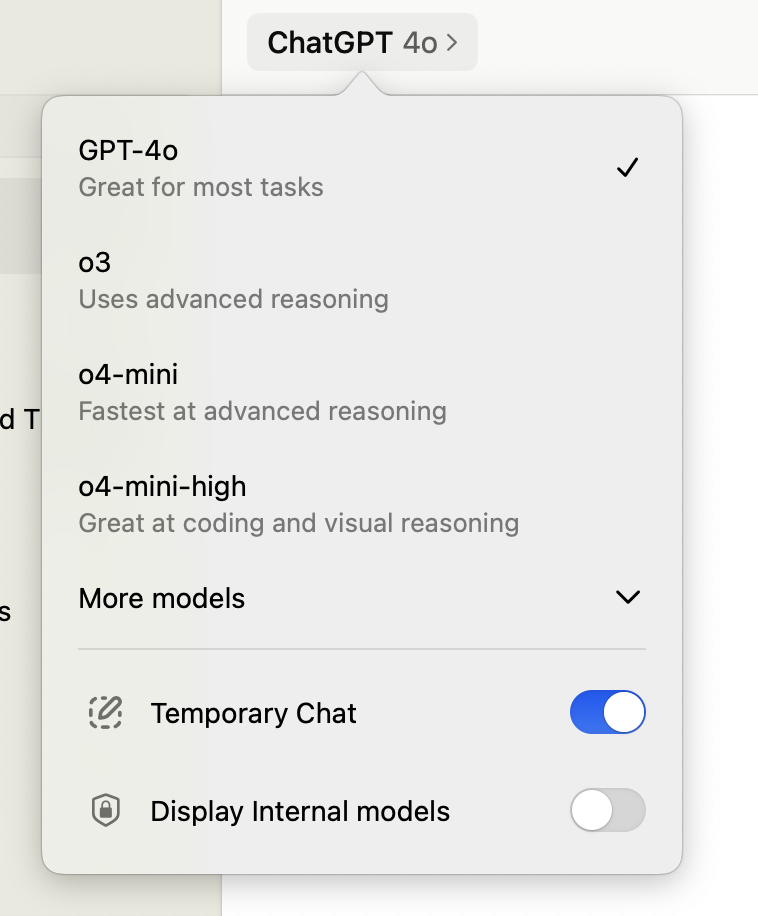
Web subscribers do not have these configuration options, but they can optimize their usage by switching between models manually. If you are doing basic proofreading or formatting, manually selecting a lighter model preserves your allocation of high-performance queries for tasks that actually require deeper reasoning.
Over time, your usage patterns may change, requiring you to apply for higher developer rate limits. OpenAI automatically increases your limit tier as you establish a history of successful payments, allowing your applications to make more simultaneous requests without getting blocked by the system.
Frequently asked
As an Amazon Associate I earn from qualifying purchases. This does not affect the price you pay. Affiliate disclosure