
Is a Fliki Review Worth Buying in 2026?
Decide whether Fliki is worth paying for in 2026 by comparing its script-to-video workflow, AI voice tools, stock media support, limitations, and ideal use cases.
Some links are affiliate links: we may earn a commission if you sign up or buy through them, at no extra cost to you.
On this page9 sections
- 1The short answer
- 2Is a Fliki Review Worth Buying in 2026?
- 3How Fliki’s Script-to-Video Workflow Works
- 4AI Voiceovers, Pronunciation, and Language Options
- 5Stock Media, Automated Matching, and AI Avatars
- 6Fliki Versus a Traditional Video Editor
- 7How to Evaluate Fliki Before Paying
- 8Who Should Buy Fliki—and Who Should Skip It?
- 9Frequently asked
The short answer
- Fliki excels at turning blog posts and text scripts into voiced social videos within minutes.
- The extensive library of realistic AI voices reduces the need for expensive external voice talent.
- Advanced editors will find the lack of multi-track timeline controls limiting for complex projects.

Yes, Fliki can be worth buying in 2026 if you regularly turn scripts, articles, or ideas into simple voiceover-led videos. Its text-first workflow suits creators who prioritize speed and accessibility. It is less suitable if you need detailed timeline control, complex effects, or highly original visuals. This assessment explains what to check before paying and how a thorough review can inform your decision.
Is a Fliki Review Worth Buying in 2026?
A Fliki review is useful before buying because the decision depends less on the length of its feature list than on how well its workflow matches your production needs. Fliki centers video creation on a script rather than a conventional editing timeline. That can reduce setup work for explainers, educational clips, narrated social posts, and other formats built around spoken text. It can also feel restrictive when a project depends on precise cuts, layered graphics, detailed color work, or custom animation.
Start by identifying the work you want the platform to replace. If you currently spend significant time generating narration, sourcing stock clips, adding captions, and arranging straightforward scenes, Fliki may consolidate several steps. If you already use a professional editor efficiently, it may work better as a draft generator than as your only production tool. Our detailed Fliki Review examines the wider feature set and user experience before you decide.
How Fliki’s Script-to-Video Workflow Works
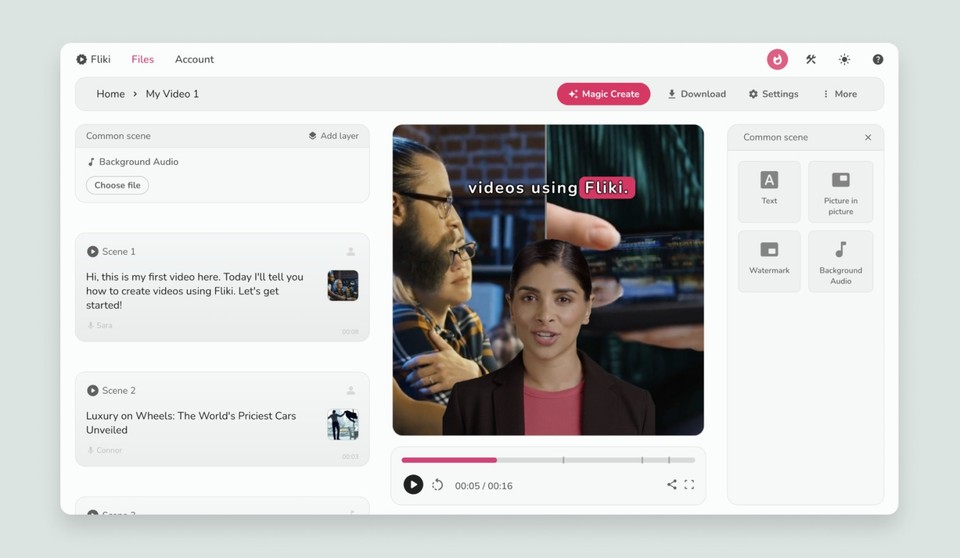
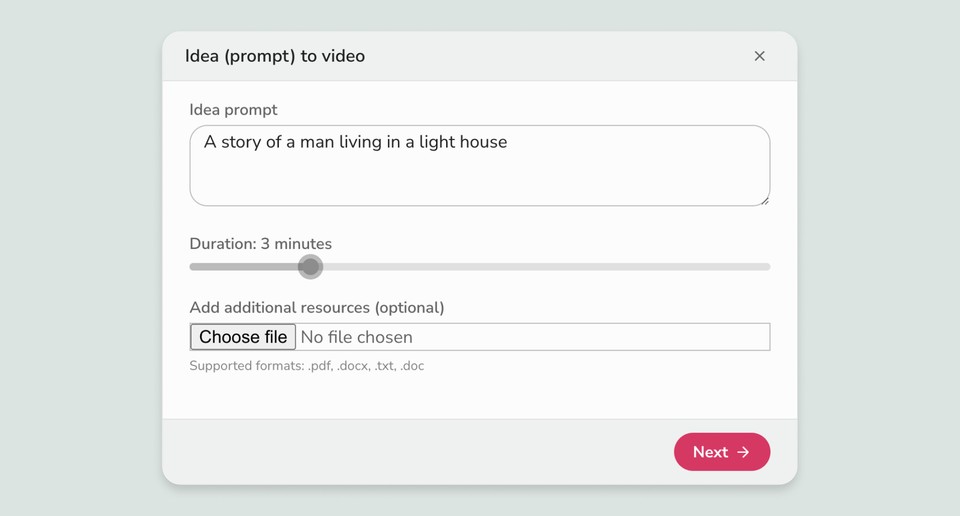
When you log into the platform, the primary workspace centers around a linear text editor rather than a complex video timeline. Instead of cutting video clips on a traditional track, you paste or type your script into sequential text blocks. The system automatically divides your text into scenes, analyzing the words in each block to suggest matching media assets from its built-in library.
Within this interface, you can quickly adjust the aspect ratio of your project to fit different social platforms, switching between vertical, horizontal, or square layouts. Every text block corresponds directly to a scene in your video, making it easier to visualize the narrative as you write. This structured layout streamlines text-driven video creation by reducing the need to sync basic narration and visual elements manually.
For creators who find traditional video editors intimidating, the document-like environment may be easier to learn. The trade-off is that a block-based workflow does not offer the same flexibility as a detailed multi-track editor. See the full Fliki interface assessment for more context on whether that compromise fits your process.
AI Voiceovers, Pronunciation, and Language Options
The audio configuration panel is where you select and customize the voice that narrates your video. The tool uses text-to-speech technology to generate narration from the script. Voice selection can be filtered using characteristics such as language, dialect, and gender, helping creators find an option suited to the intended audience and format.
The pronunciation map editor is particularly relevant for scripts containing brand names, technical terms, personal names, or acronyms. If the generated voice mispronounces a word, a phonetic correction can improve consistency across the project. Pauses, pacing, and emphasis still require careful review because generated narration may not interpret every sentence as a human speaker would.
These controls can help teams establish a consistent voice without recording every draft manually. They are also useful for producing variants of the same script. However, voice quality should be judged with your own material, since tone, pronunciation, and naturalness vary by voice and subject. Before subscribing, test representative scripts rather than relying only on polished examples.
Stock Media, Automated Matching, and AI Avatars
The media selection panel allows you to populate scenes with images, video clips, and background audio. Automated media matching can produce a quick first draft by pairing words or topics in the script with stock assets. When a suggestion misses the intended meaning, you can search for a replacement or upload your own material. This combination is useful for creators who want assistance without giving up all control over scene selection.
For projects that need a visible presenter, Fliki also includes AI avatar options. These can support training material, explainers, or localized content where filming a presenter is impractical. They should still be previewed carefully for lip synchronization, expression, and suitability for the subject.
Because the system reduces the manual search for background assets, it can shorten the assembly stage of a basic video. Automation does not remove editorial responsibility, though. Generic b-roll can make several scenes look repetitive, and literal keyword matching may produce visuals that conflict with the script’s context. Replacing weak suggestions with relevant uploads or carefully chosen stock footage usually produces a more coherent result.
Fliki Versus a Traditional Video Editor
Choosing between automated creation and manual editing comes down to production priorities. Traditional editing software provides detailed control over cuts, transitions, color, audio layers, and effects, but it usually demands more time and technical familiarity. Fliki prioritizes a guided, script-led process, making it more appropriate for repeatable formats and high-volume content pipelines.
The key differences are practical. Fliki can generate an initial scene structure and narration from text, while a conventional editor requires those elements to be assembled manually. It can pull stock media into the project, whereas traditional tools often rely on assets sourced elsewhere. Conversely, a traditional multi-track timeline makes it easier to combine several visual and audio layers, refine exact timings, and build custom effects.
That means speed is Fliki’s central advantage, while granular control is its main compromise. Some creators may use both: Fliki for narration and early drafts, followed by another editor for detailed finishing. Review the Fliki buying guide if you need a closer comparison of its strengths and constraints before choosing a workflow.
How to Evaluate Fliki Before Paying
A useful evaluation begins with a real project rather than a generic demonstration. Choose a script similar in length, tone, and complexity to the content you expect to produce. Break it into short paragraphs so each block represents a distinct visual idea, then create a draft and check how much manual correction it requires.
First, review the narration for pacing, pronunciation, and emphasis. Next, inspect every visual match for relevance and repetition. Test the intended aspect ratio and confirm that captions, text, and important visual details remain readable. If you publish in more than one language, try the relevant voice and script workflow rather than assuming every language will behave identically. Finally, note which adjustments require another editing application.
The most useful measure is not how quickly the first draft appears, but how long it takes to reach a publishable result. A fast draft may offer little value if every scene needs replacing. If the tool repeatedly handles narration, scene structure, and basic media selection with limited cleanup, paying for it may be easier to justify.
Who Should Buy Fliki—and Who Should Skip It?
Fliki is a practical candidate for content marketers, educators, bloggers, and social media teams producing narrated explainers, summaries, tutorials, or short informational videos. It can also suit solo creators who are comfortable editing text but do not want to learn a complex timeline application. For these users, the main value is reducing repetitive production work around narration, scene creation, captions, and stock-media selection.
It is a weaker fit for filmmakers, motion designers, and editors who need precise control over every frame. Projects built around original footage, layered sound design, custom animation, or complex visual continuity may exceed what a script-based editor is designed to handle. Occasional users should also consider whether they will create enough videos to benefit from a recurring plan.
The sensible decision is based on frequency, required polish, and cleanup time. Choose Fliki if its automated workflow consistently gets your typical project close to completion. Skip it if you spend more time correcting automation than assembling the video in your current tools. For a broader verdict, read our in-depth Fliki Review.
Frequently asked
As an Amazon Associate I earn from qualifying purchases. This does not affect the price you pay. Affiliate disclosure