
Fliki Review: What to Know Before Buying
Before buying Fliki, assess its credit model, plan restrictions, editing workflow, voice options and reliance on stock media against your expected output.
Some links are affiliate links: we may earn a commission if you sign up or buy through them, at no extra cost to you.
On this page9 sections
- 1The short answer
- 2What to Know Before Buying Fliki
- 3Understand Fliki Credits and Usage Limits
- 4Check Premium Features and Plan Gatekeeping
- 5Plan and Preview Your First Video
- 6Compare Stock Media With AI-Generated Visuals
- 7Decide Whether the Editor Fits Your Workflow
- 8Choose a Plan Around Your Output Goals
- 9Frequently asked
The short answer
- Credit systems do not translate directly to minutes; high-quality assets consume your monthly balance much faster.
- Advanced tools like hyper-realistic AI avatars and voice cloning are gated behind higher subscription tiers.
- Evaluate competitive alternatives if your production workflow requires extensive, original AI-generated footage over stock media.

Before buying Fliki, know that the right plan depends on how credits translate into usable output, which voice and avatar tools your tier includes, and whether a script-first editor suits your workflow. Check current plan details and estimate the cost of drafts, revisions and final exports before subscribing. Our full Fliki review provides further context.
You should also decide whether stock-led visuals fit your creative goals. Fliki is built around turning text into narrated scenes, but creators who need detailed timeline control or consistently original footage may prefer a different editing approach. Reviewing these constraints before choosing a plan can prevent an avoidable upgrade or a poor workflow fit.
The quick version
- Finalize the script in a separate
- Preview available voices and choose one
- Break long paragraphs into scene-sized segme…
- Mark names, acronyms and technical language
- Review the project’s estimated usage before
- Inspect scene timing, captions, framing and
What to Know Before Buying Fliki
Start by defining what you intend to publish, how often you will publish it and which features are essential. A creator making occasional narrated explainers has different requirements from a team producing frequent branded campaigns. Write down your expected video length, number of monthly projects, preferred languages, export needs and whether you require avatars, custom voices or collaboration.
Then compare that list with Fliki’s current plan documentation rather than assuming every promoted feature is included in every tier. The most important checks are credit usage, feature limits, export conditions and editing control. Plan terms can change, so verify them immediately before paying, especially if you are considering a longer commitment. Use the Fliki subscription review as a structured guide, but treat Fliki’s current account and plan information as the final reference for your purchase decision.
Understand Fliki Credits and Usage Limits
The first hurdle many new users face is navigating the credit-based billing system used by modern AI video platforms. Instead of treating the subscription as unlimited production, estimate how much of your allowance each project could use. Voice generation, visual creation and other processing tasks may be counted differently, depending on the current plan and feature.
If you plan to make multiple videos each week, calculate your likely credit burn before committing. Include first drafts, revised narration, replacement visuals and final versions rather than counting only completed exports. A project that appears affordable at the outline stage can require more usage after script changes or scene-level corrections.
Check the dashboard’s estimate before generating content, and verify what happens when the allowance is exhausted. Also confirm whether unused credits carry forward, because rollover rules can materially affect creators with irregular publishing schedules. Avoid assuming that every preview, edit or uploaded asset is billed in the same way; consult the current product documentation for the exact rules.
Plan and Preview Your First Video
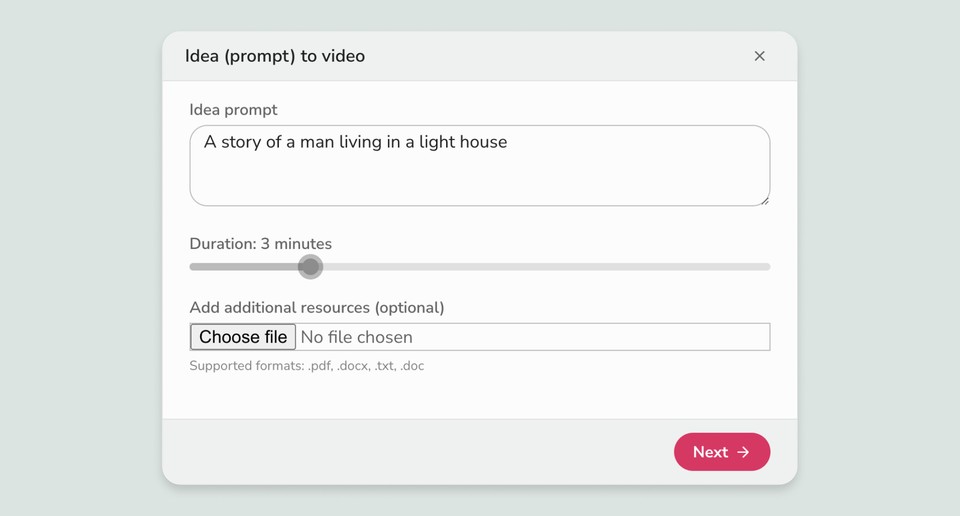
To avoid spending your allowance on preventable mistakes, use a structured preparation process. Draft and proofread the script outside the platform, then divide it into short scenes before generating narration or visuals. This makes it easier to spot repetition, pronunciation problems and awkward transitions early.
- Finalize the script in a separate text editor.
- Preview available voices and choose one that suits the subject and audience.
- Break long paragraphs into scene-sized segments.
- Mark names, acronyms and technical language that may need pronunciation adjustments.
- Review the project’s estimated usage before generation.
- Inspect scene timing, captions, framing and visual relevance before the final export.
If a low-cost preview or draft option is available on your plan, use it to check pacing and layout. Do not assume every regeneration is free. Saving a clean master script and a scene list also makes later revisions easier because you can change only the affected portions instead of rebuilding the entire project.
Compare Stock Media With AI-Generated Visuals
A major differentiator among AI video tools is how they source visual elements. Some workflows emphasize newly generated clips, while others rely more heavily on integrated stock libraries and automated scene matching. Before subscribing, decide whether familiar real-world footage, original synthetic visuals or a mixture of both fits your intended style.
Fliki’s text-led workflow can pair scripts with stock assets and also includes generative capabilities, according to the cited reviews. Stock media integration can be efficient for explainers, list videos and narrated presentations because it reduces manual searching. The trade-off is that automatically selected footage may feel generic, repeat across projects or represent a sentence only loosely.
Original text-to-video visuals may suit unusual concepts, but generated clips can still require selection and correction. Test both routes with the kind of script you actually publish. Examine visual relevance, consistency between scenes, cropping for your target format and the effort required to replace unsuitable assets. This practical trial is more useful than judging the platform from a polished demonstration alone.
Decide Whether the Editor Fits Your Workflow
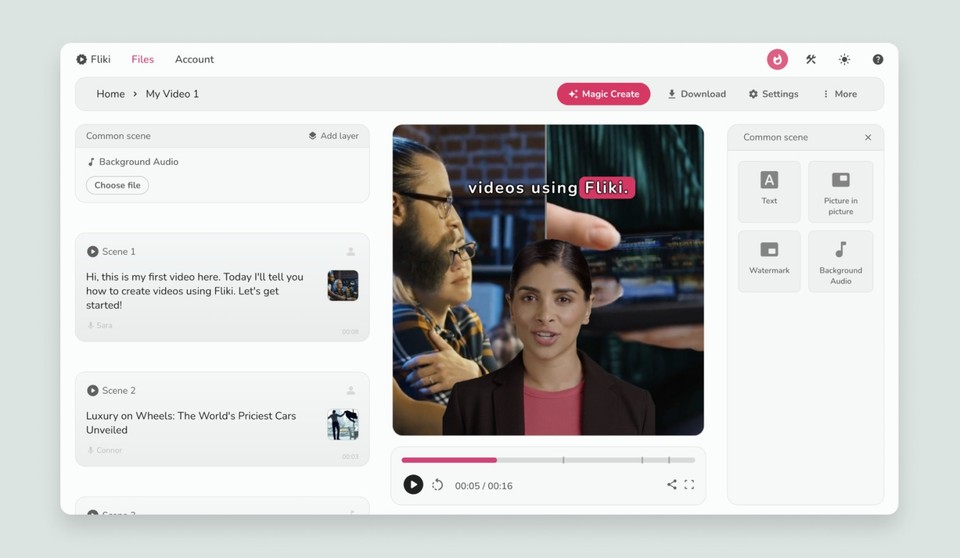
The editing model can matter more than the length of the feature list. Fliki uses a script-first approach in which written sections become narrated scenes. That can suit beginners, educators and marketers who want to assemble straightforward videos from text without managing a complex timeline.
However, a text-first editor is not the same as a traditional nonlinear video editor. If you need precise keyframes, layered effects, intricate audio mixing or frame-level timing, check whether Fliki provides sufficient control or whether you will need a separate editor. Moving files between tools can add time and complicate revisions.
Run a representative project before committing: import or paste a real script, replace a mismatched visual, adjust pronunciation, alter scene length, add captions and prepare the intended aspect ratio. Note where the workflow feels fast and where it creates friction. The goal is not to find the platform with the most controls; it is to choose the interface that supports your actual production process with the fewest repeated steps.
Choose a Plan Around Your Output Goals
There is no single plan that works for every type of video creator. To find the right fit, evaluate your expected monthly output and the channels where you intend to publish. Estimate the number of videos, average duration, likely revision count and the proportion that will use generated voices or visuals.
Casual creators producing occasional clips may need fewer resources than an agency or content team handling frequent campaigns. Teams should also check workspace access, review processes, brand controls and account administration. These operational features can affect daily work even when the core generation tools are identical.
Start with the lowest tier that includes every must-have capability, provided its allowance reasonably covers your forecast. Avoid paying for capacity without a clear production need. If a trial or free access level is currently offered, use it to test one realistic project rather than a short sample script. Before making a longer commitment, review cancellation terms, renewal settings, current usage rules and the process for changing tiers. Our Fliki buying guide brings these decision points together.
Frequently asked
As an Amazon Associate I earn from qualifying purchases. This does not affect the price you pay. Affiliate disclosure